
Our API is a standard RESTful API, protected using bearer tokens.
In order to use it you will need to first obtain a token from our Identity Server. This server implements OAuth 2 and OpenIDConnect protocols, and is based on the Open Source IdentityServer4 product. A good starting point is this summary from their docs:
There are different ways of obtaining a token (to support different scenarios like running as a service, acting on behalf of a user, providing your own login, etc). The primary use case we support is you creating an application or service to make requests, in this case, you are likely to follow the Client Credentials OAuth 2 flow:
We will supply you with the credentials needed in the form of a Client Id & Client Secret. You will submit these to our Identity Server in order to obtain an Access Token.
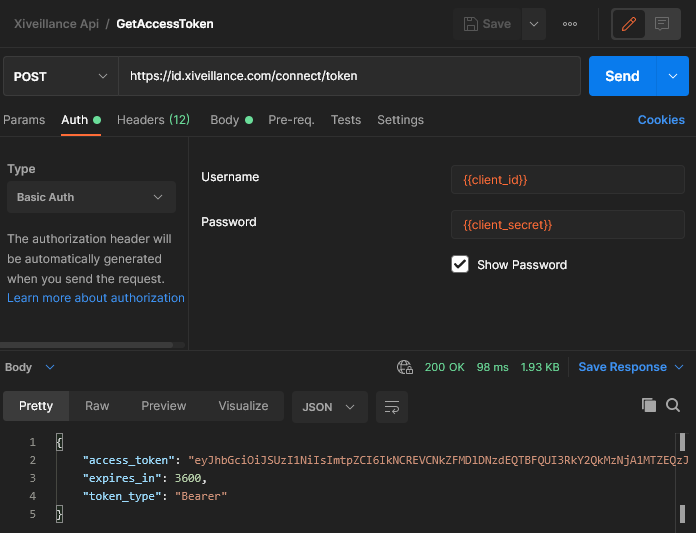
When you request the Access Token, you'll also be told when it expires (in an hour). This Access Token must be submitted to our API with every request as a "Bearer Token".
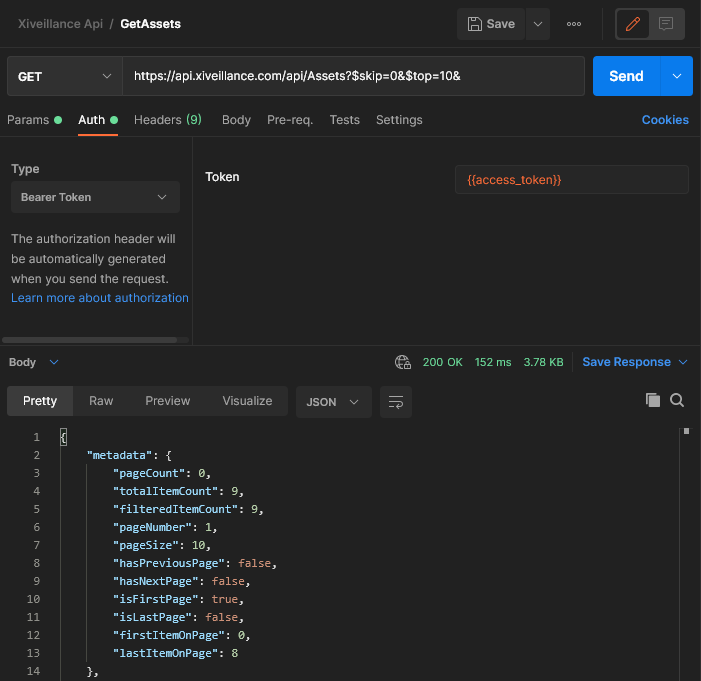
The full list of available endpoints in our API are documented here:
We use this same API to power our screens, so you have full access to anything available through the website. Normally the easiest way for you to work out which API call to make is to go to the screen in our system that has the data you need and then look at the network calls made using Dev tools.
Attached is a Postman collection to demonstrate this functionality. Postman is an application for making test API calls, and showing the parameters/properties needed to make these calls. To use these examples, you will need to install Postman:
You will then need to import both the "Environment" and the "Collection" (both attached to this post), and then set the client_id and client_secret variables in the Environment to the values we supplied.
Next you should run "GetAccessToken" to obtain the access token, and then run "GetAssets" to use that access token to list the Assets you have setup.
If you have any problems connecting to our API, or need credentials to connect - please log a support ticket and one of our team will get back to you as soon as possible.